GitHub's own "Download ZIP" button only ever gives you the entire repository. If you only need one example folder, one package in a monorepo, or one set of assets, RepoKit adds a dedicated download button to every individual folder — so you get exactly what you asked for.
Click "Code → Download ZIP" anywhere on GitHub and you get the entire repository, every folder, every branch's worth of history baked into that one snapshot — even if all you actually wanted was the examples/basic-usage folder or a single package inside a monorepo. For large or monorepo-style projects, that's a lot of unwanted weight for a small ask, and it's the reason third-party "download this GitHub folder" websites exist at all — people hit this exact wall constantly enough to build entire services around solving it.
RepoKit solves it natively, inline, without sending anything to a third-party server. Hover any folder row in a GitHub repo and a small folder-zip icon appears next to it. Click it, and RepoKit fetches every file inside that specific subtree through GitHub's API, packages them client-side into a .zip using the JSZip library running entirely in your browser, and triggers a standard download — done in seconds for a typical folder, with a visible progress state for larger ones.
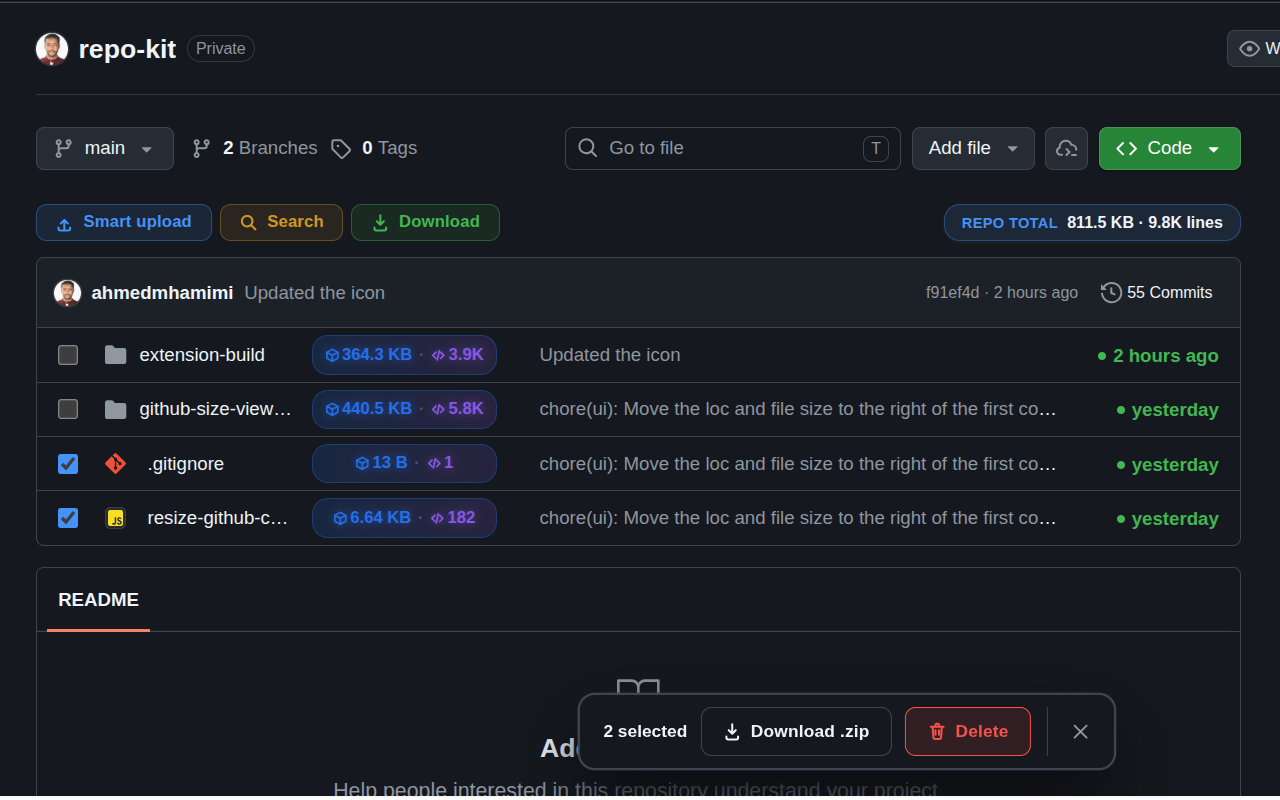
Beyond single-folder downloads, RepoKit adds checkboxes to file rows so you can hand-pick a specific set of files and folders — say, three examples out of a directory of twenty — and download just that selection as one .zip, using the same selection toolbar GitHub already shows for other bulk actions like delete, just extended with a Download .zip option.
This is a meaningful distinction from the many "paste a GitHub folder URL" websites people currently use for this task: those services route your request through their own servers, meaning a third party sees which repos and folders you're pulling from — a nontrivial consideration for private work or sensitive projects. RepoKit runs entirely client-side inside the extension; every file request goes directly from your browser to GitHub's API using your own (optional) authentication, and the zip assembly happens locally. No intermediary server ever sees what you downloaded.
Curious what this looks like in a private repository? RepoKit connects the same token-based access used for private repo browsing to folder downloads too, so this works identically whether the repo is public or gated behind your GitHub account.
RepoKit adds a native .zip download button to every folder on GitHub, no cloning and no third-party site required.
Add RepoKit to Chrome — it's free Repo
Repo