GitHub's default file browser tells you a file's name, its last commit message, and how long ago it changed. It has never told you how big it is. RepoKit fixes that by putting a precise, byte-accurate size badge on every single row — files and folders alike — the moment the page loads.
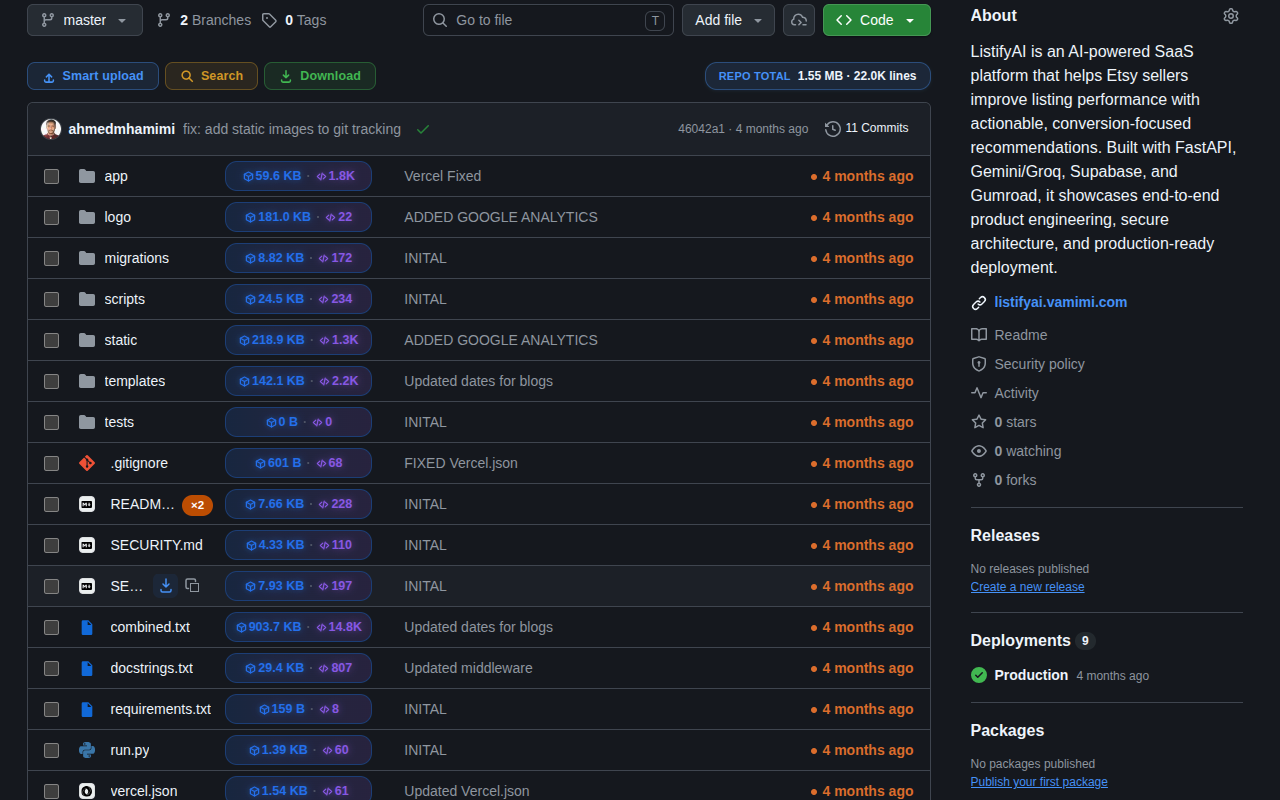
GitHub's repository view is optimized for reading commit history, not for understanding the shape of a codebase. If you've ever needed to know whether a node_modules folder accidentally got committed, whether a "docs" directory is secretly 400 MB of PDFs, or which file is the real weight-bearing giant in a repo, your only official option was to clone the whole thing and run du -sh locally — a slow, heavy-handed way to answer a question that should take one glance.
RepoKit closes that gap directly inside the page you're already looking at. When you land on any GitHub repository, folder, or pull request file view, it quietly calls GitHub's own Git Trees API (the same data source the github.com UI itself is built on) to pull the recursive tree for the current branch, then walks the DOM and drops a compact, color-coded size chip next to every row — 2.4 MB for a folder, 18.6 KB for a single file, and a running REPO TOTAL badge pinned near the toolbar summing everything currently in view.
Each chip shows the size in the most readable unit (bytes, KB, or MB depending on magnitude) and, where available, a companion line-count figure — so you get both "how heavy" and "how much code" in a single glance without opening the file. Badges are color-weighted too: unusually large entries stand out visually against the rest of the listing, which is often the fastest way to spot the one bloated asset or dependency folder that's dragging a repository's clone time up.
For folders specifically, the size shown is the recursive total of everything nested inside — not just the immediate children — so a folder badge genuinely tells you "if I clone or download just this directory, this is what I'm getting."
Byte-accurate sizing turns into a genuinely practical signal in a few recurring situations: deciding whether it's safe to download a folder as a .zip on a slow connection, spotting a misconfigured .gitignore that let build artifacts slip into version control, doing a first-pass sanity check before adding a new dependency to a project, or simply satisfying the very reasonable question "how big actually is this thing" before you commit fifteen minutes of your day to cloning it.
Size alone tells you weight. For a sense of actual code volume — as opposed to binary assets, images, or lockfiles inflating the byte count — combine this with RepoKit's lines-of-code estimate, which runs alongside the size badge on the same rows.
git cat-file -s would report for that blob.Install RepoKit and every file and folder on GitHub gets a size badge automatically. Free, no account, no setup.
Add RepoKit to Chrome — it's free Repo
Repo