Navigating a large repository by clicking through nested folders is slow, especially when you already know roughly what the file is called. RepoKit adds an instant search modal, reachable from any page on the repo, that jumps straight to the file you're thinking of.
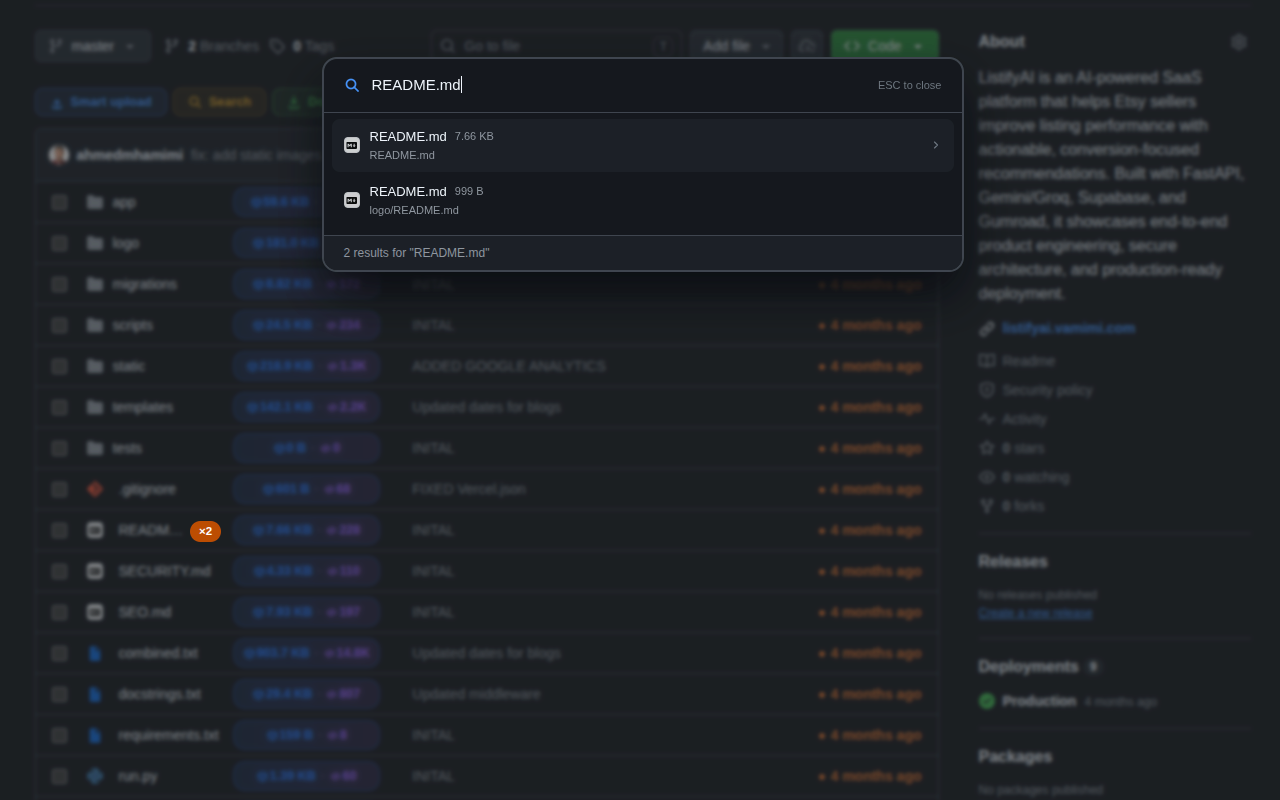
Press Ctrl+Shift+K (or Cmd+Shift+K on Mac) anywhere on a GitHub repository page — the root, a deeply nested folder, even a pull request view — and RepoKit opens a search modal over the current page. Start typing part of a filename and results appear instantly, ranked by relevance: exact matches and prefix matches rise to the top, followed by partial and fuzzy matches elsewhere in the path.
Because RepoKit has already indexed the full repository tree to power its size and line-count badges, this search has zero additional load time — there's no separate "building the index" step, it's simply querying data that's already resident in memory from the moment the page loaded.
Results aren't just a bare filename — each one displays the file's full path (so you can tell utils/format.ts apart from lib/legacy/format.ts at a glance), its size, and — if RepoKit has detected the same filename elsewhere in the repo — a note that it's one of several duplicates, linking directly into the duplicate detection feature. Selecting a result navigates straight to that file's GitHub page, skipping every intermediate folder click entirely.
Once the modal is open, arrow keys move the selection and Enter jumps to the highlighted file — the whole flow is designed so your hands never need to leave the keyboard between "I want to find a file" and "I'm looking at it," which matters most in exactly the repositories where it's needed: large, deeply nested ones where mouse-driven folder navigation is genuinely slow.
RepoKit's search modal is one keyboard shortcut away on every repository page. Free, instant, no setup.
Add RepoKit to Chrome — it's free Repo
Repo