A 40 MB repo could be forty megabytes of actual source code, or it could be one enormous PNG and a README. RepoKit's lines-of-code estimate sits right next to the size badge on every file and folder, so you can tell the two apart in the same glance instead of guessing.
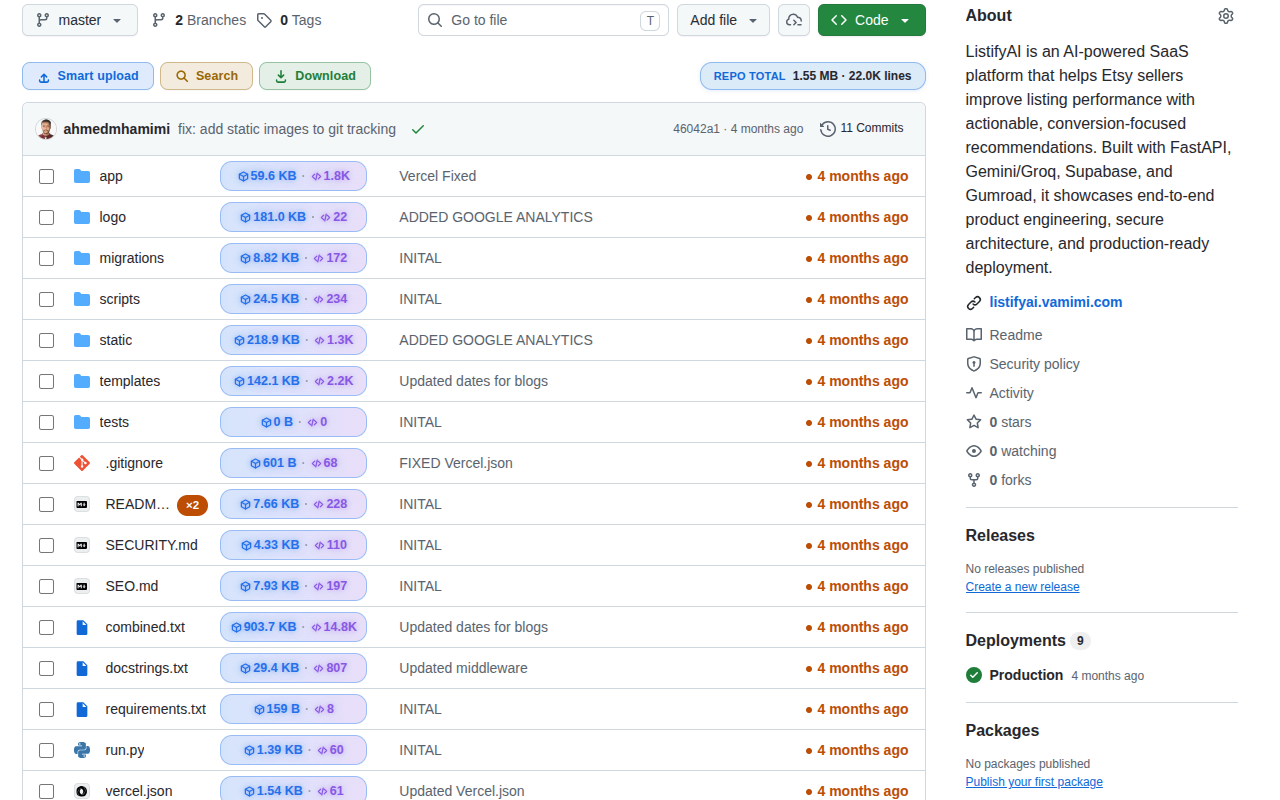
"How big is this repository" is really two different questions wearing one trench coat. There's disk weight — how many megabytes you'll pull down — and there's code volume — how much actual logic you're signing up to read, review, or maintain. A repository full of pre-rendered documentation images or a checked-in vendor/ directory can be enormous in bytes while containing very little written code. Conversely, a lean, dependency-free utility library can weigh almost nothing while still representing thousands of carefully written lines.
RepoKit's lines-of-code estimate exists specifically to separate those two signals. It runs as a companion figure to the byte-size badge, appearing on the same rows, so a quick scan of a repo's root listing tells you not just "this folder is 12 MB" but "this folder is 12 MB across roughly 8,400 lines" — two numbers that, read together, say something neither says alone.
RepoKit reads file contents through GitHub's API and counts newlines efficiently across the tree, layering the result in as a second pass after the initial size annotation (which only needs lightweight tree metadata and therefore appears first). Binary and non-text files — images, fonts, compiled bundles, lockfile blobs — are correctly excluded from the count rather than reported with a misleading line number, since a "line count" for a PNG isn't a meaningful concept.
The result is a genuinely useful estimate, not a precision code-metrics tool. It's the same category of signal as running wc -l across a checkout — a fast, honest approximation of scale, not a claim about code quality, complexity, or test coverage.
This estimate deliberately trades perfect precision for speed and repo-wide coverage — the goal is an at-a-glance figure for every row in a large tree, not a slow, exhaustive audit of one file. For a line-by-line reading of a specific file's actual content, opening the file in GitHub's normal view (which now also shows line numbers) remains the right tool.
wc -l would give you across a tree, not a cyclomatic-complexity or code-quality metric. It's meant to answer 'how much text is actually in this file or folder,' which is usually the question people actually have when sizing up an unfamiliar repo.RepoKit adds line-count estimates next to file sizes across every GitHub repository you visit. Free, instant, zero setup.
Add RepoKit to Chrome — it's free Repo
Repo